All Gadgets

gd-plug-ui - Plugin Manager UI
by imjp94
User interface for plugin manager gd-plug(https://godotengine.org/asset-library/asset/962) This version is only compatible with Godot 4.x, check out godot3(https://github.com/imjp94/gd-plug-ui/tree/godot3) branch for older version This addon require gd-plug(https://godotengine.org/asset-library/asset/962) and git. Make sure to update gd-plug to at least 0.2.5(godot4) or 0.1.4(godot3)

Godot Common Game Framework
by jocamar
A set of useful nodes to use in Godot projects that facilitate implementing features like split-screen, asynchronous scene loading, a global event manager and caching materials. Documentation at: https://github.com/jocamar/Godot-Common-Game-Framework If you have any questions you can reach out me on Twitter and I'll be happy to help: https://twitter.com/joaomarinheiro

Color Eater - Mobile Demo
by kamyworldproductions
A simple demo project for mobile games in Godot called Color Eater. It is there for it to be used as a reference project on mobile game creation. This project showcases how to achieve many features in Godot. Features: UI, Score System, Character Selection System, Button System/Animation, Music/Sound-Effects/Vibration Toggles, Scene changes and a simple game with particle system for you to understand the game loop and how those informations are saved on mobile.

DotnetQuestSystem
by tru1ng
Simple implementation of a quest system on dotnet with an interface for godot

Snippets Editor Plugin 3.0.4
by gswashburn
An editor plugin for Godot Engine 3.x to manage code snippets in your projects. Edit, Copy, Add and Delete frequently used pieces of code into your Godot 3.x projects. v1.1 Internal Editor added to right mouse click on code snippet.

Joypads (Gamepads) Demo
by godotengine
A tool for testing joypad input and generating controller mapping strings. See documentation: https://docs.godotengine.org/en/latest/tutorials/inputs/controllers_gamepads_joysticks.html Language: GDScript Renderer: Compatibility

Rush Request
by eranot
Rush Request is the easiest way of making HTTP requests with JSON in Godot 4. Inspired by the JS library Axios, it creates requests in a Promise-like way.

Rapier Physics 3D - Fast Version with Parallel SIMD Solver 3D
by ughuuu
A 3D drop-in replacement for the Godot engine that adds stability and fluids. This version is deterministic, just not cross platform deterministic. This version has: - SIMD (Single instruction, multiple data) operations for even faster performance - parallel solving.

License Manager
by iceflower
Manage license and copyright for third party graphics, software or libraries. Group them into categories, add descriptions or web links. The data is stored inside a json file. This file is automatically added to the export, you do not need to add it yourself. If you provide license files instead of a text, they are also exported. If paths are added to license data, it will be automatically adjusted if you rename a file or folder inside the editor. You can change the project license file eithe...

Mi Bubble Dialogue 2D
by miisan
BubbleDialogue is a simple easy to use bubble dialogue plugin It Features: Customizable dialogue bubbles User-friendly custom dialogue editor integration

Godot Card Layout
by cyanglaz
A Godot plugin providing a lightweight solution for card game layouts. Tutorial available at the Github page: https://github.com/cyanglaz/gcard_layout
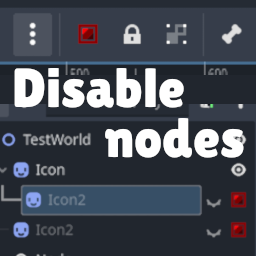
Node Disabler - Disable nodes with a single action
by gustjc
Toggle nodes active state with a quick action. Use this to quickly toggle nodes on/off to help debug your game. Either a hotkey or a new button at the top bar. A disabled node has its process_mode disabled and its visibility turned off. An icon in the scene tree will also be there to help you see which nodes are disabled. The shortcut key is `Control+R` but it can be changed in the settings.